
A WooCommerce order tracking page lets customers check an order themselves with its order number and email address, without logging in. WooCommerce has a basic order tracking shortcode, but no place for carrier tracking numbers. StoreRuler's free "Where is my order?" page shows the order's status and the tracking numbers your team recorded.
Why an order tracking page cuts support messages
"Where is my order?" is the question a small shop hears most after checkout. Each one costs a few minutes: find the order, check the parcel, write back. A page that answers it does that job at any hour, and the customer gets an answer at once instead of waiting for yours.
The page only helps if two things are true: the status is up to date, and the tracking number is on the order. The page is the window; your order routine is what fills it.
What WooCommerce offers out of the box
- My Account → Orders. Customers with an account see their orders and each order's status. Guests who checked out without an account do not have this.
- The order tracking shortcode. WooCommerce includes a
[woocommerce_order_tracking]shortcode. Put it on a page, and a customer can enter an order ID and the billing email to see the order and its status. - Order emails and notes. WooCommerce emails the customer when an order is processing and when it is completed. You can also add a note to the customer on the order, which WooCommerce sends by email.
What WooCommerce does not have is a field for the carrier and the tracking number. Many stores paste the number into a customer note by hand. And the status "Completed" alone does not tell the customer whether the parcel left this morning or arrived yesterday.
Common mistakes with tracking pages
- Asking for too little. Order numbers are easy to guess: anyone can type 1001, 1002, 1003. Always ask for a second detail that only the buyer knows, such as the email on the order.
- Showing too much. The person typing may not be the buyer. The status and the tracking number answer "where is it?"; names, addresses and products are not needed for that.
- No limit on failed tries. Without one, a script can try thousands of combinations.
- Hiding the page. Link it from your footer, your contact page and the messages you send when an order ships.
- Stale statuses. If orders stay "Processing" for days after they leave, the page tells customers nothing has happened.
Checklist for a useful tracking page
- Create a page called "Where is my order?" or "Track your order".
- Add the tracking form and publish the page.
- Link it from the footer and the contact page.
- Write the carrier and tracking number on every order when it ships, ideally with an expected delivery date.
- Tell the customer when it ships, with the tracking number in the message.
- Test the page with a real order number and email, and once with a wrong email.
The "Where is my order?" page in StoreRuler
StoreRuler adds an Order tracking block and a shortcode, [storesuit_order_tracking]. Put either one on a page and publish it. Customers enter the order number and the email address they used at checkout; no account or login is needed.
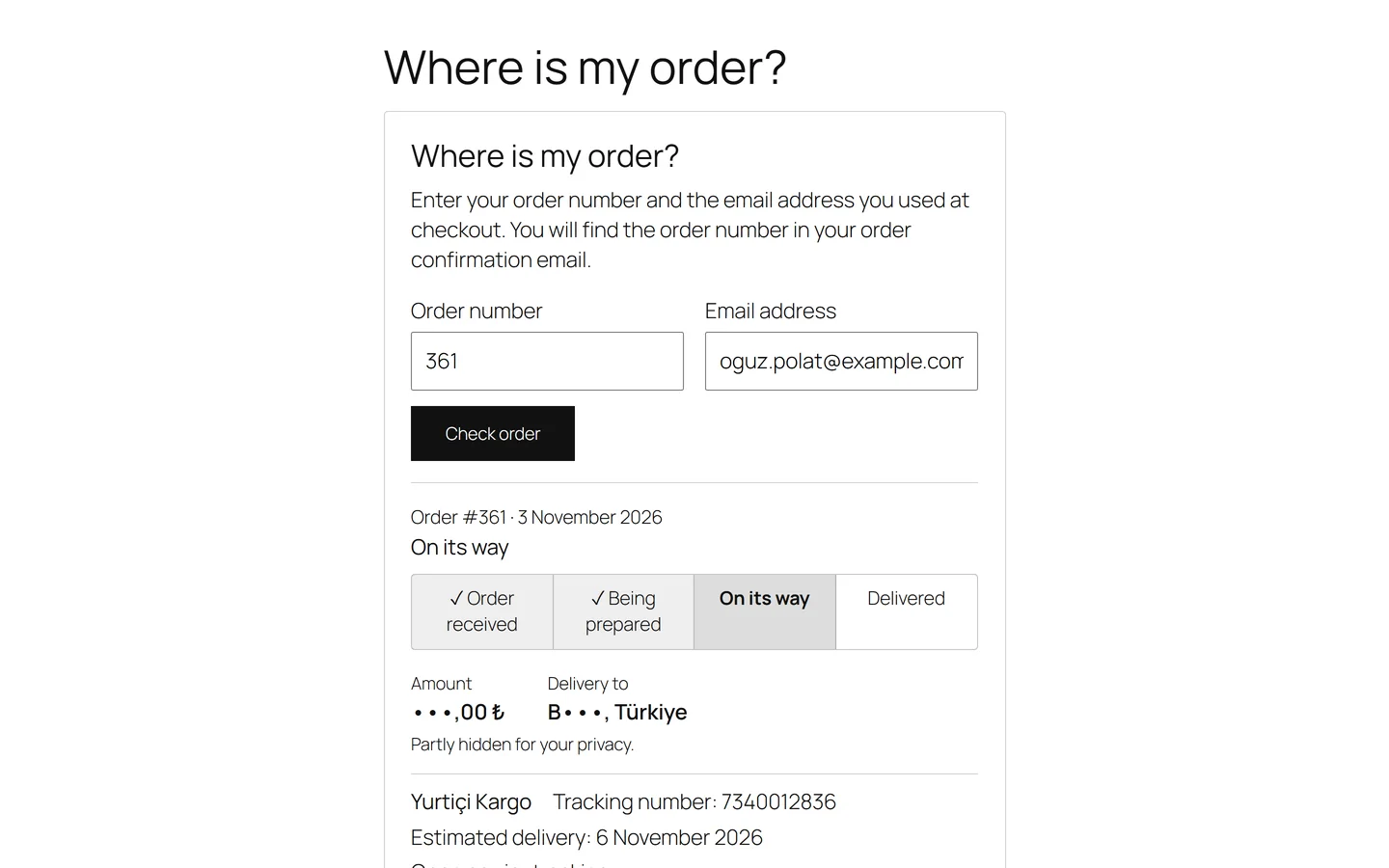
When both match one order, the customer sees:
- the order number, the date and the current status, with progress steps: Order received, Being prepared, On its way and Delivered, or Ready for pickup and Picked up when the customer collects in store;
- each parcel's carrier, tracking number and expected delivery date;
- the amount and the delivery city and country, partly hidden for privacy.
Names, street addresses, phone numbers and products are never shown. Every wrong combination gets the same answer, so the form does not reveal whether an order number or an email exists. After five failed tries for the same email or the same order number, the form asks the visitor to try again in an hour. Orders placed with the store's own email address are not shown, because that address is public.
Under StoreRuler → Settings → Order tracking you see which published pages show the form, or a warning when none does, and you can add a WhatsApp button with your store's number. It opens WhatsApp only when the customer taps it.
Filling the page: recording shipments
The page shows what your team records. When an order ships, open it in StoreRuler and record the shipment: carrier, tracking number and expected delivery date. Keep the names of up to eight carriers you use in StoreRuler's carrier list, so recording one is a single choice. A shipped order reads "On its way" until you confirm the delivery on the order; then it reads "Delivered".

Then send the tracking details. StoreRuler can send them with WooCommerce's customer note email after you preview it, copy the message for you to paste, or open it as a WhatsApp draft. The screenshot is from a paid plan, which adds an invoice details box; the shipment record and its buttons are the same in the free version.
StoreRuler does not connect to carriers' systems. The page shows the tracking numbers your team records, and the carrier's own website shows where the parcel is.
Which plan includes it
The "Where is my order?" page, shipment records, the carrier list and tracking messages are in the free StoreRuler plugin on WordPress.org and in every paid plan. The setup steps are in the "Where is my order?" page guide, and recording carriers and tracking numbers is covered in shipping and tracking. For an overview, see the shipping page.
Frequently asked questions
Does WooCommerce have an order tracking page?
It has an order tracking shortcode, [woocommerce_order_tracking], where a customer enters the order ID and billing email to see the order. WooCommerce has no field for a carrier or tracking number, so on its own it cannot say where a parcel is.
Can guests track an order without an account?
Yes. On StoreRuler's "Where is my order?" page, customers enter the order number and the email address on the order. No login is needed.
Does StoreRuler show the carrier's live parcel status?
No. The page shows the carrier, the tracking number and the expected delivery date that your team recorded on the order. The customer follows the parcel itself on the carrier's website.
Which shortcode does StoreRuler use?
[storesuit_order_tracking]. You can also add the Order tracking block. [storesuit_order_tracking title="no"] leaves out the heading.
