
To add an order tracking page to WooCommerce with StoreRuler, place the Order tracking block, or the [storesuit_order_tracking] shortcode, on a page and publish it. Customers enter their order number and the email address they used at checkout, and see the order's status and tracking numbers. No account is needed. It is in the free version.
Why a tracking page saves you messages
Without a tracking page, a customer who wants to know where the parcel is has to write to you and wait. WooCommerce has a basic tracking form of its own, but it only shows what WooCommerce stores: the order's status and details. It knows nothing about how far the parcel has got or which carrier took it.
StoreRuler's page shows the stage your team recorded on the order desk and the tracking numbers you saved on the order, in a short card that keeps personal details out.
Add the page
- In WordPress, create a new page. A title such as "Where is my order?" works well; when the page has exactly that title, the form leaves out its own heading so it does not appear twice.
- In the block editor, add the Order tracking block (it is listed under Widgets). In another editor, paste
[storesuit_order_tracking]instead. - Publish the page and link it from your menu or footer, so customers can find it.
- Open StoreRuler → Settings and the Order tracking card. Under "Customers find it on:" you should see your page. If no published page has the form yet, a warning says so.
The block has one setting, Show the heading, in its sidebar. With the shortcode, [storesuit_order_tracking title="no"] hides the heading.
What customers see
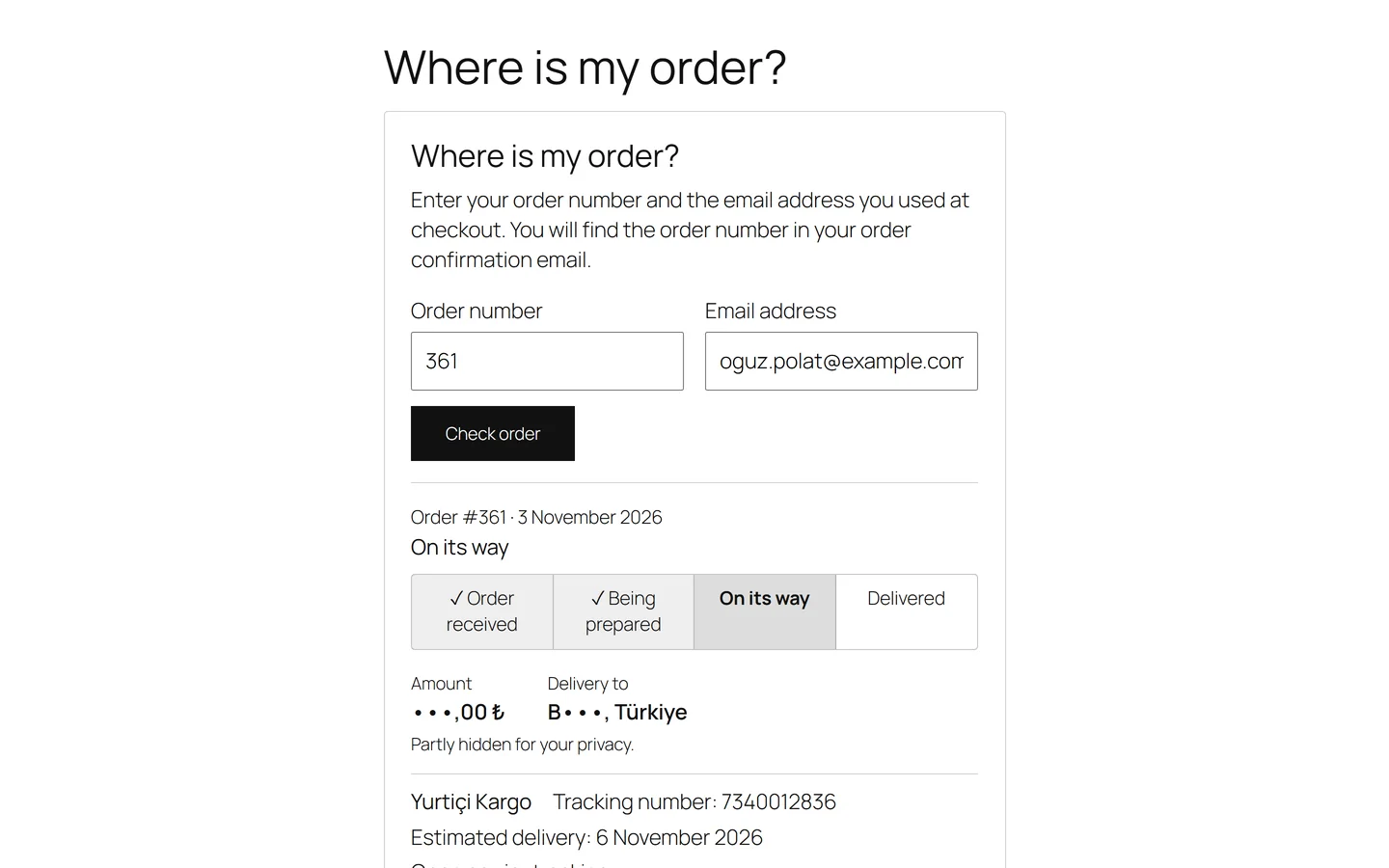
After a successful lookup the card shows:
- the order number and date, and the status in plain words;
- a row of steps: Order received, Being prepared, On its way and Delivered, or, for store pickup, Order received, Being prepared, Ready for pickup and Picked up;
- the amount and the destination partly hidden, for example "B•••, United Kingdom", with the line "Partly hidden for your privacy.";
- up to five parcels, each with the carrier, the tracking number, the estimated delivery date and, when the carrier has one, an Open carrier tracking link.
Other states have their own words, such as Awaiting payment, Payment failed, Order cancelled or Order refunded. When part of the order has shipped, the card says "Part of your order is on its way." Delivered appears only when a delivery or handover was recorded; a shipped order otherwise stays On its way.
The card never shows a name, street, phone number, email address, product, note or payment method.
Security and limits
- The order number and the email address must both belong to the same order. A leading "#" is fine, and stores with their own order number format work too.
- Every miss gets the same answer, "We could not find an order with those details.", so nobody can test which part was wrong.
- After five failed attempts for the same email address or the same order number within the hour, the page answers "Too many attempts. Please try again in an hour." A successful lookup is not counted.
- Orders placed with the store's own email address are not shown there, because that address is public.
- Failed attempts are counted under hashed keys only, for an hour; no email address, order number or IP address is stored.
Add a WhatsApp button
On the same Order tracking settings page, tick Show a WhatsApp contact button, enter the Store WhatsApp number with country code and click Save settings. The card then shows a "Contact the store on WhatsApp" link. It opens WhatsApp only when the customer chooses it, and no order data goes with it.
Keep the page accurate
The page shows what your team records. Move orders through the stages on the order desk and save the carrier and tracking number as soon as a parcel leaves, as described in Shipping and tracking. The page is in the free version and in every StoreRuler Pro plan.
Next step: send the page's address to customers who ask about their order, and see shipping for the rest of the delivery tools.
Frequently asked questions
Do customers need an account to track their order?
No. They enter the order number and the email address on the order. No account or login is needed.
What is the shortcode?
Use [storesuit_order_tracking]. To leave out the "Where is my order?" heading, use [storesuit_order_tracking title="no"].
Does the page show the carrier's live parcel status?
No. It shows the order's status as your team recorded it on the order desk, the tracking numbers you saved and, when StoreRuler knows it, a link to the carrier's tracking page.
Does it work with page caching?
Yes. The page itself holds no order data, so a page cache may keep it. The answer to a lookup is sent separately and is never cached.
