
WooCommerce has eight core order statuses: Pending payment, Failed, Processing, On hold, Completed, Cancelled, Refunded and Draft. Processing means the payment came in (or the customer chose cash on delivery) and the order waits for you to send it; Completed means you have finished it. The status also decides when stock goes down and which emails are sent.
The full list of WooCommerce order statuses
Each status has a name you see in the admin and an internal name with a wc- prefix, which you meet in code, exports and some plugin settings.
| Status | Internal name | What it means | Stock |
|---|---|---|---|
| Pending payment | wc-pending | The order exists, but no payment has been received. The shopper may still be paying, or may have left. | Not reduced |
| Failed | wc-failed | The payment was declined or did not go through. The customer can try to pay again from their account. | Not reduced |
| Processing | wc-processing | Payment received, or cash on delivery chosen. The order is waiting to be prepared and sent. | Reduced |
| On hold | wc-on-hold | Waiting for you to confirm the payment, typically a bank transfer or a cheque. | Reduced |
| Completed | wc-completed | The order is finished. For physical goods you (or a tool) set this status. | Reduced |
| Cancelled | wc-cancelled | Cancelled by you, by the customer while it was unpaid, or by WooCommerce when an unpaid order ran out of hold stock time. | Put back, if it had been reduced |
| Refunded | wc-refunded | The whole order was refunded. WooCommerce sets it when the refunds reach the order total. | Put back only for the lines you restock |
| Draft | wc-checkout-draft | Created by the Checkout block while the shopper is still on the checkout page. It becomes a real order when they place it. | Not reduced |
A partial refund does not change the status: the order stays Processing or Completed with a refund line on it. Every status change is written to the order notes, so you can always see who or what moved an order and when.
Processing vs completed: what is the difference?
This is the question most store owners search for, because the two look alike in the order list.
- Processing is the start of your work. The money is in (or will be collected on delivery), stock has been reduced, and the customer has received the "processing order" email. Nothing has been packed yet.
- Completed is the end of your work. WooCommerce sends the customer the "completed order" email, which most stores word as "your order is on its way" or "your order is ready".
WooCommerce only completes an order by itself when every product in it is both virtual and downloadable. Anything with a physical product stays in Processing until someone marks it Completed. Two problems follow from that. If you mark orders Completed in the morning before they leave, customers get the email too early. If nobody marks them at all, the Processing list fills with orders that left weeks ago and stops telling you what still needs work.
The statuses that cause the most confusion
Pending payment is not an order to pack
A pending order has no payment and has not reduced stock. Packing it means sending goods nobody paid for. If stock management is on, the "Hold stock (minutes)" setting under WooCommerce → Settings → Products → Inventory decides how long WooCommerce waits before it cancels an unpaid pending order and frees the stock.
On hold means money is expected
On hold orders have reduced stock, but the money has not been confirmed. Check your bank account before you send them, then move them on.
Failed is not the same as cancelled
Failed means the payment attempt went wrong; the customer can still pay. Cancelled means the order is closed. A cluster of failed orders from one customer is worth a look before you ship their next one.
Draft orders are part of the block checkout
Drafts appear when your store uses the Checkout block. They are not orders yet, so do not count them as sales. WooCommerce removes old drafts on its own schedule.
Can you add a custom order status?
Not from the WooCommerce settings. A status such as "Shipped" or "Ready for pickup" needs a code snippet or a plugin. Before you add one, check three things:
- Emails. A custom status sends no email unless someone builds one for it.
- Stock. Moving an order into a custom status does not reduce or restore stock by itself.
- Reports. WooCommerce Analytics has settings for excluded and actionable statuses under Analytics → Settings. A new status may need to be added there, or its sales go missing from the figures.
Often you do not need a new status at all: what you want to track is the stage of the work (picked, packed, handed to the carrier), which can live next to the status rather than replace it.
A practical checklist for order statuses
- Agree on one rule for Completed, for example "when the parcel is handed to the carrier or the customer collects it".
- Check On hold orders against your bank account every day.
- Set a hold stock time that matches your payment methods, so abandoned pending orders free their stock.
- Never pack a Pending payment or Failed order.
- When goods come back, refund with the restock option ticked for the lines that are sellable again.
- Before adding a custom status, decide who sets it, which email it sends and whether reports must count it.
- Read the order notes when an order looks wrong: every status change is recorded there.
How StoreRuler's order desk stages relate to WooCommerce statuses
The free StoreRuler plugin shows every order on an order desk grouped by stage: New, Preparing, Ready to ship and Completed, plus a tab for cancelled and returned orders. The stages are read from the WooCommerce order and from what your team recorded on it. StoreRuler adds no order status of its own and keeps no second copy of the order.
| Desk stage | When an order is there | WooCommerce status |
|---|---|---|
| New | Nobody has started preparing it. A pending order also shows here, with "Waiting for the customer's payment" as its next step instead of "Start preparing". | Pending payment, Processing or On hold, unchanged |
| Preparing | Someone started preparing it, or picked or packed a line. | Unchanged |
| Ready to ship | Every line is packed. | Unchanged |
| Completed | Everything was handed to the carrier or collected in person, or the order was completed in WooCommerce. | Completed, once nothing is left to pay |
| Cancelled / returned | The order is closed. | Cancelled, Failed, Refunded or Draft |
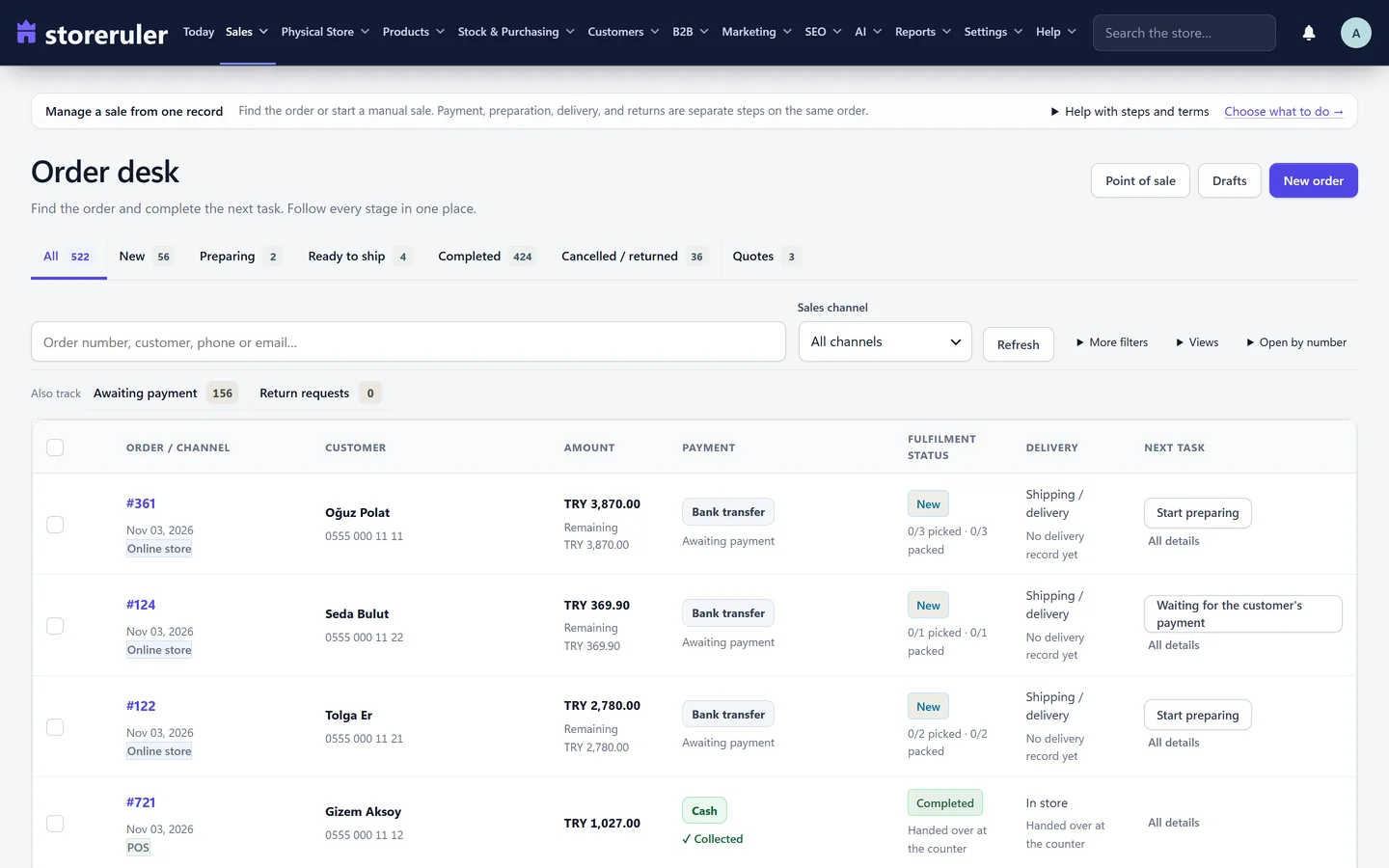
The picture comes from an example store on a paid plan, so it also shows counter sales and quotes. The stages are the same in the free version.
A few rules keep the WooCommerce status honest:
- When an order is fully shipped or handed over and nothing is left to pay, StoreRuler sets it to Completed in WooCommerce, which sends WooCommerce's usual email.
- A cash on delivery order that has been shipped stays open, labelled "Shipped · collect on delivery", until you confirm the delivery. Only then is it completed.
- Shipping an order whose prepayment has not arrived, such as a bank transfer still on hold, asks you to confirm that you ship without waiting for the money.
- In the free version, an On hold or Pending order with an open balance can be marked as paid, which moves it on through WooCommerce's own payment step.
- Cancelling an order in StoreRuler cancels it in WooCommerce, which puts its stock back.
- If another plugin added a status such as "Shipped" or "Delivered", the desk counts those orders as completed.
To see the steps in practice, read how to print a pick list in WooCommerce, or start with the order desk guide. The order management overview shows the rest of the order screens.
Frequently asked questions
What is the difference between processing and completed in WooCommerce?
Processing means the payment came in, or the customer chose cash on delivery, and the order is waiting for you to send it. Completed means the work is finished. WooCommerce sends the customer a different email for each, so set Completed when the order has really left.
Does WooCommerce mark orders as completed by itself?
Only orders that contain nothing but virtual and downloadable products, once they are paid. An order with a physical product stays in Processing until someone, or a tool such as StoreRuler, sets it to Completed.
Why are my orders stuck in pending payment?
The shopper did not finish paying, or the payment provider did not report the payment back to your site. Check the payment method and its logs. With stock management on, WooCommerce cancels unpaid pending orders after the hold stock time you set.
Does StoreRuler add its own order statuses?
No. Its order desk stages (New, Preparing, Ready to ship, Completed) are read from the WooCommerce order and from what your team recorded on it. The WooCommerce status stays one of the standard ones.
