
WooCommerce does not print packing slips on its own. To print packing slips without prices, use a plugin that builds one page per order with the delivery address and the items, and leaves the money out. In the free StoreRuler plugin, you tick the orders on the order desk and click Packing slips; prices are never printed on them.
Packing slip, order summary and invoice are different papers
Three documents often get mixed up:
| Document | Who it is for | Prices |
|---|---|---|
| Packing slip | The packer, and the person who opens the parcel | No |
| Order summary | The customer or your counter, as a record of the order | Yes |
| Invoice | The customer and the tax office | Yes, with the details your country requires |
A packing slip says what is in the box and where it goes. An invoice is a legal document, and its rules on numbering, tax details and record keeping differ from country to country. Adding prices to a slip does not turn it into an invoice.
Why leave prices off the packing slip
- Gifts. The person who opens the parcel should not see what the sender paid.
- Parcels sent to someone else, such as an office reception or a relative.
- Discounts and price changes. A customer who paid a sale price, or sees a lower price next week, does not need the number in the box.
- Fewer questions. A slip with prices but without proper tax lines can look like a faulty invoice.
What plain WooCommerce offers
WooCommerce has no packing slip or invoice printing. The order emails and the customer's account show the order with its prices, and you can print an order screen from the browser, but that page is made for staff: it carries prices, notes and admin controls. Most stores add a plugin for printouts, and many of those plugins handle invoices and slips together.
Whatever you use, check three things: whether prices can be left off, whether refunded items disappear from the slip, and whether you can print many orders at once instead of opening them one by one.
What a good packing slip shows
- Your store's name and address, so a returned parcel finds its way back.
- The order number and date, so the customer can quote them.
- The delivery address and a phone number for the courier, or a clear "store pickup" when the customer collects it.
- Each product with its options, its SKU and the units actually sent.
- The note the customer left at checkout, such as "please leave it with the neighbour".
A packing routine that catches mistakes
A slip only helps if someone checks the box against it. A short routine at the packing table catches most wrong parcels before they leave:
- Print the slips for the batch you are about to pack, in the same order as the parcels.
- Put each order's items next to its slip before anything goes into a box.
- Count the units against the slip, then check every option: size and colour are the usual mistakes.
- Read the customer's note. It often asks for something the packer has to do, such as "no plastic, please".
- Put the slip inside, on top, and close the box.
- Record the shipment on the order, so the customer can follow it and nobody packs it twice.
When a product is missing from the shelf, set the slip aside with the items you have and deal with it as one case, instead of sending a half-filled box with a slip that lists everything.
Printing packing slips with StoreRuler
StoreRuler's order desk, under StoreRuler → Sales, lists your orders by stage. Tick the orders on the page (30 a page; one printout takes up to 100) and choose what to print:
- Packing slips: one A4 page per order, without prices.
- Order summaries: the same layout with prices, WooCommerce's own totals (subtotal, discount, shipping, fees, taxes, payment method, refunds and total), the billing details and the order status. Each page says it is not a tax invoice.
- Pick list: one list of every product in the selection, for batch picking.
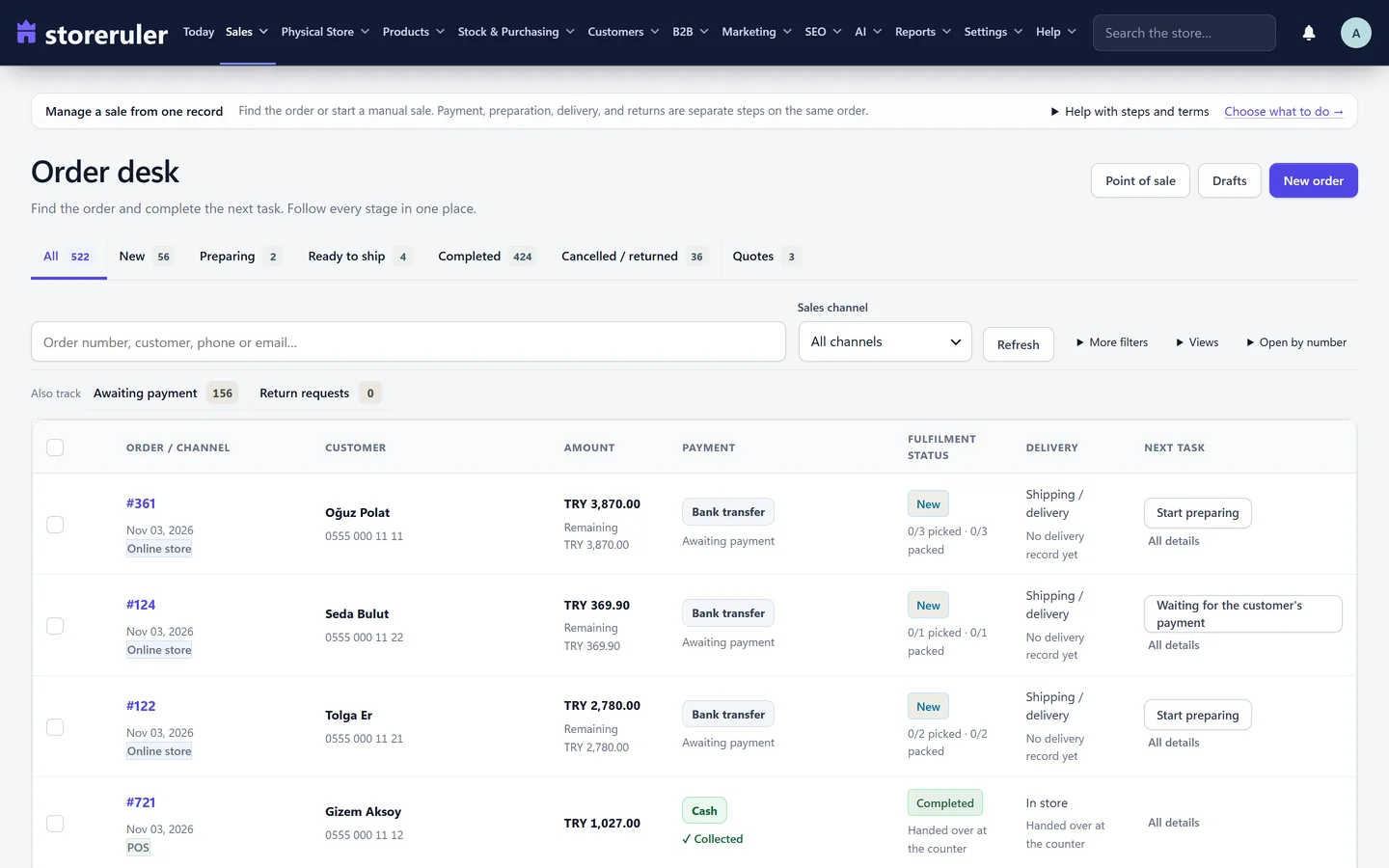
The screenshot comes from a store on a paid plan, which shows a few extra tabs; selecting orders and printing work the same in the free version.
Each packing slip shows your store name and address from WooCommerce's settings, the order number and date, the delivery method, and the delivery address with a phone number. When an order has no separate delivery address, the billing address is used; an order the customer collects says "Store pickup". The products are listed with their options, SKU and units. Refunded units are taken off, and a line refunded in full is not printed. The customer's note gets its own box. Cancelled, failed, refunded and draft orders are left out and listed at the bottom of the page.
The slips open in your browser with a Print button, and each order starts on a new sheet. Your browser's print dialog can also save them as a PDF if you want to keep a copy.
In StoreRuler Pro, a team member with the warehouse role can print pick lists and packing slips but not order summaries, so the people packing parcels do not see prices.
Invoices are a separate job
StoreRuler does not issue invoices, receipts or any other official document. Packing slips and order summaries are working papers for your team and information for your customers. If your country requires invoices, use an invoicing service or plugin that meets its rules, and keep StoreRuler's slips for the packing table.
Which plan includes it
Packing slips, order summaries and pick lists are in the free StoreRuler plugin on WordPress.org and work the same in every paid plan; see pricing for what the plans add. The steps are in the pick lists and packing slips guide, and the rest of the daily order work is on the order management page.
Frequently asked questions
Can WooCommerce print packing slips by itself?
No. WooCommerce has no packing slip or invoice printing. You can print an order screen from the browser, but it is an admin page with prices and controls. Most stores add a plugin for printouts.
Do StoreRuler packing slips ever show prices?
No. Packing slips never show prices. If you need a printout with prices, use Order summaries, which show WooCommerce's totals and state that they are not a tax invoice.
Can I print packing slips for many orders at once?
Yes. Tick the orders on the StoreRuler order desk and click Packing slips; each order gets its own page. One printout takes up to 100 orders, and the desk shows 30 a page.
Is a packing slip the same as an invoice?
No. A packing slip lists what is in the parcel and where it goes. An invoice follows your country's tax rules. StoreRuler does not create invoices.
