
A WooCommerce cash on delivery order normally goes to Processing, with a note that payment is made on delivery. In the order list it looks just like a paid order, although no money has arrived. The main risks are refused deliveries, cash the courier has collected but not yet paid you, and customers who refuse again and again.
How cash on delivery works in plain WooCommerce
Cash on delivery is one of WooCommerce's built-in payment methods, under WooCommerce → Settings → Payments. Its settings are short: a title, a description, instructions shown on the thank-you page and in emails, the shipping methods it is offered for, and whether it is accepted for virtual orders.
When a shopper chooses it, WooCommerce:
- normally puts the order in Processing and adds a note that payment is due on delivery;
- reduces stock, as for any paid order;
- stores a paid date, because the order moved to Processing, even though nobody has paid yet;
- sends the usual "processing order" email to the customer.
What it does not have: an extra fee for cash on delivery, a way to refuse the method to a particular customer, or a mark that says "the money is in". Marking the order Completed is the only signal, and that is easy to do too early.
The real risks of cash on delivery
- Refused or unclaimed parcels. You usually pay shipping both ways, the stock is away for days, and the goods may come back damaged.
- Money held by the courier. The carrier collects the cash and pays you later. Until then the sale is only a promise, and a lost remittance is hard to spot order by order.
- Revenue that is not yet money. Reports that count every Processing order as a sale overstate what you have actually received.
- Fake and impulse orders. With nothing paid up front, some orders are placed with no intention to buy.
- Repeat refusers. The same person, sometimes under a second email address or phone number, refuses delivery several times.
Ways to limit cash on delivery risk without dropping it
- Offer cash on delivery only for the shipping methods where your carrier collects cash, and not for virtual orders.
- Ask for a phone number at checkout, and call to confirm large or unusual orders before you ship.
- Keep cash on delivery orders open until the money is in. Do not mark them Completed when they leave.
- Match the courier's remittance statements against your open cash on delivery orders every week.
- Record every refused delivery on the order, so the history is there next time.
- Stop offering cash on delivery to customers who keep refusing, while keeping card and bank transfer open to them.
- If you charge a fee or set a minimum order for cash on delivery, say so clearly at checkout. WooCommerce needs code or a plugin for either.
Hiding the method for certain customers also needs code: the woocommerce_available_payment_gateways filter decides which payment methods the checkout offers.
Keeping track of cash still to collect, free
The free StoreRuler plugin treats a cash on delivery order as unpaid until it is delivered:
- On the order desk, a shipped cash on delivery order is labelled "Shipped · collect on delivery" and stays open, even though WooCommerce stored a paid date.
- Its next step is Confirm delivery, where you enter the recipient or a delivery reference. Only then does StoreRuler set the order to Completed in WooCommerce.
- The sales report shows the cash on delivery still to collect, next to net sales, orders and refunds.
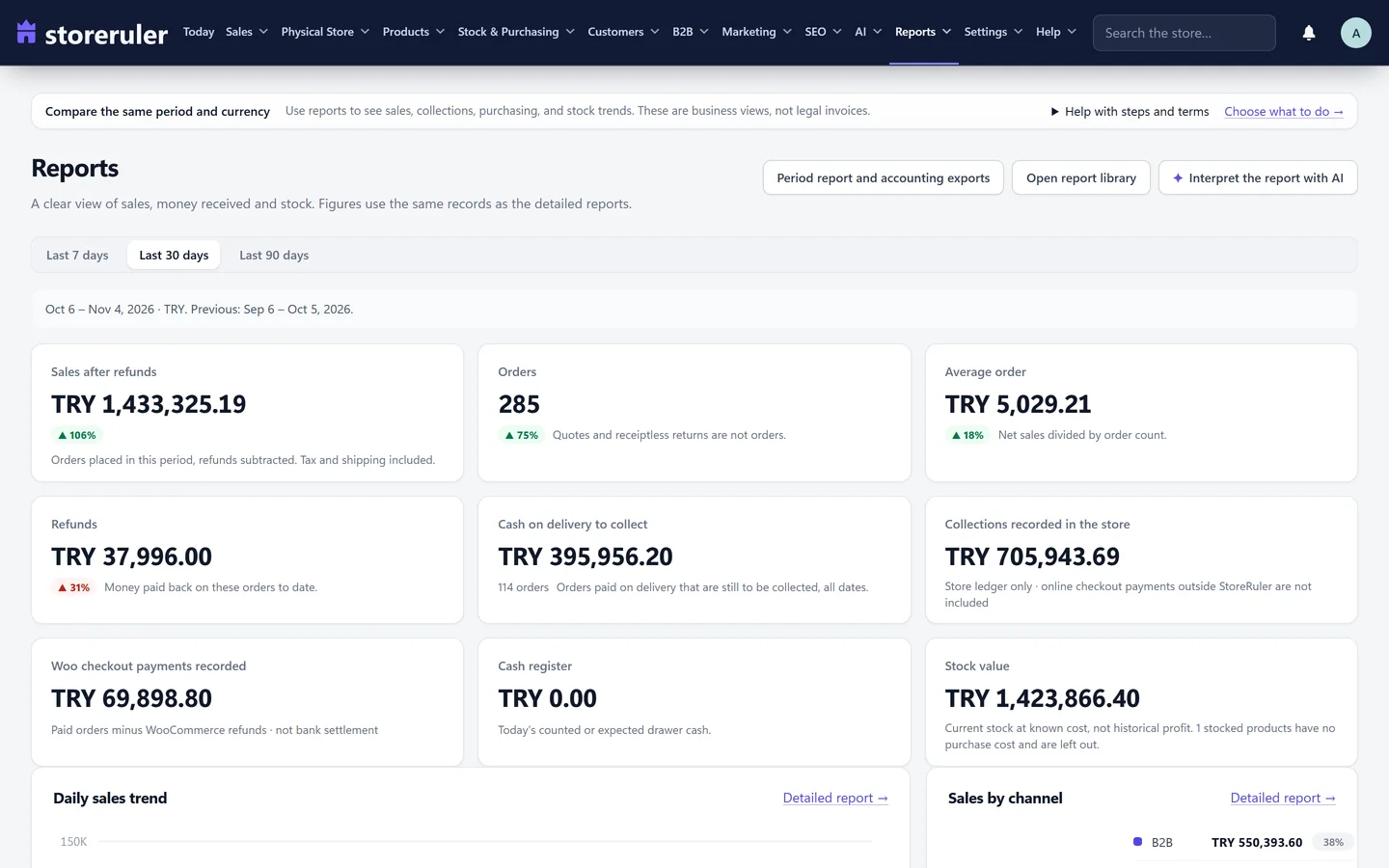
The picture is the reports screen of an example store on a paid plan; the "Cash on delivery to collect" figure is also in the free sales report.
The cash on delivery guard and risky-customer flags in StoreRuler Pro
StoreRuler Pro adds three tools on the order screen.
Stop offering cash on delivery to a customer
From an order, choose "Stop offering cash on delivery". From then on the checkout hides cash on delivery when that customer's email address or phone number is used; their other payment methods stay available. Phone numbers are compared by their last ten digits, so a number written with or without a country code still matches. If the method still reaches the classic checkout, the order is refused with a message asking for another payment method. StoreRuler keeps only keyed one-way fingerprints of the email address and phone number, never the address or number itself. "Offer cash on delivery again" lifts the block.
Risky customer flags
The order screen marks a customer as risky, with the reasons, when their recent orders reach the counts you set. Out of the box, the period is 12 months and the counts are one delivery not taken, three cancelled orders, three failed payments, or three refunded or returned orders. Setting a count to 0 turns it off. A customer is recognised by the same account, email address or phone number. Your team can mark a customer they know as trusted, and the customers screen lists everyone the rules mark as risky. The counts are read from your own orders each time; nothing new is stored about the customer.
Delivery not taken
When a shipped parcel comes back, "Delivery not taken" closes the order as cancelled. You choose whether the products go back into stock (because the parcel is back) and whether to stop cash on delivery for the customer in the same step. Nothing was collected, so no money moves. An order that already has payments or refunds goes through the return flow instead.
In Pro, collected money is recorded on the order, so a cash on delivery order stays unpaid in StoreRuler until someone records the money as received.
The cash on delivery guard, risky-customer flags and recorded collections are in every paid plan, starting with Pro. See the pricing page.
Start with the status
Most cash on delivery problems start with treating Processing as "paid". WooCommerce order statuses explained shows what each status really means, and the order management overview shows the order desk and the order screen. For the figures, see reports.
Frequently asked questions
What order status does a WooCommerce cash on delivery order get?
Normally Processing, with an order note that payment is made on delivery. Stock is reduced at once, although no money has arrived. Mark the order Completed only when the money is really in.
Can I hide cash on delivery for certain customers in WooCommerce?
Not with the built-in settings, which only limit cash on delivery by shipping method and for virtual orders. Hiding it per customer needs code on the woocommerce_available_payment_gateways filter, or a tool such as the cash on delivery guard in StoreRuler Pro.
Does StoreRuler keep a list of blocked phone numbers and email addresses?
No. The cash on delivery guard stores only keyed one-way fingerprints of the email address and phone number, so the list itself reveals nothing about the customer.
Does the free StoreRuler plugin help with cash on delivery?
Yes. The sales report shows the cash on delivery still to collect, and a shipped cash on delivery order stays open on the order desk until you confirm the delivery. The guard and the risky-customer flags are in StoreRuler Pro.
